
Importing a Test
You can bring an existing test into Naiku instead of retyping it. Find your format, prepare the file, then follow the import steps.
| You have | Do this |
|---|---|
| An ExamView test | Export it first |
| A SchoolNet test | Export it first |
| Questions in a spreadsheet | Build a CSV file |
| A Quia test or a text file | Use the text format |
| A Word or PDF test | Use Quick Key. Word and PDF files can’t be imported as items. |
Import your file
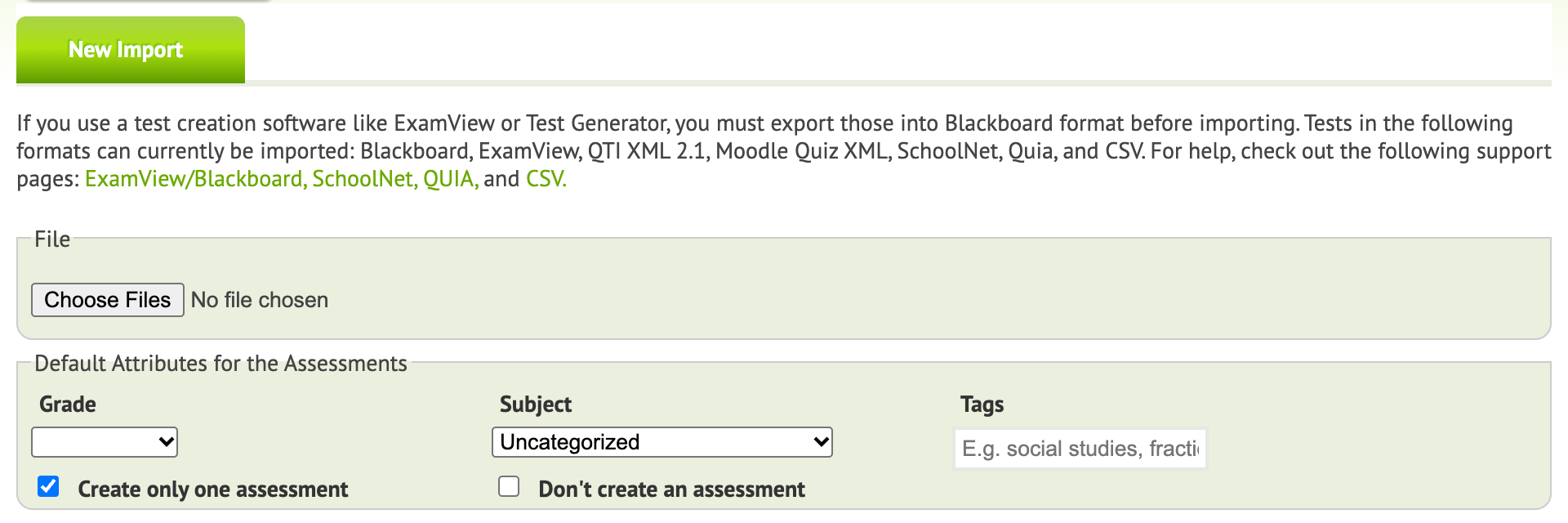
- Click Assessments, then Import.
- Click Choose File and pick your file.
- Optional settings for the test: Grade, Subject and Tags, such as
Chapter 1. Separate several tags with commas. - Optional settings for the questions: Sharing, Subject and Tags, which help you find them later. You can also align all the questions to one standard. To give each question its own standard, edit the items after the import.
- Click Start Import.
Naiku shows the import’s progress. Big tests can take a minute. When it’s done, the test appears on your Assessments page.
Open the test and look it over, especially images, tables and equations. Use Actions ▼ → Edit to rename it, set options or fix a question, then assign it.
If an import fails or takes too long, email support@naiku.net with the file attached.
ExamView
ExamView exports a Blackboard file, which Naiku imports.
- Open the test in ExamView.
- Choose File → Export → Blackboard 7.1–9.0.
- Give the file a name, for example
Quiz 1, and save it. On the next screen, enter the same name for the test name and the image directory, and click OK.
You now have a .zip file.
SchoolNet
On the Test Detail page, choose Test Actions → Export Test. You’ll get a .zip file.
CSV or spreadsheet
CSV import supports multiple choice, constructed response and matching items. Put one question on each row:
| Column | What goes in it |
|---|---|
| A | The type: mc, cr or ma |
| B | The question |
| C and on | The answers |
Save it as CSV (in Excel, File → Save As → CSV; in Google Sheets, File → Download → Comma-separated values). If you type the file in a text editor, put quotes around any text that contains a comma. A spreadsheet does this for you.
mc,What is 5+4?,1,6,8,*9
mc,What is the square root of 16?,*+4,*-4,+6,-6
cr,Who was the first President of the United States?,Washington,George Washington
ma,Match the countries and their capitals.,Austria,Vienna,USA,Washington DC,Germany,Berlin
mc,"When a question has a comma, put it in quotes.",*True,False- Multiple choice (
mc): put*before each correct answer. Two or more*answers make it multiple response. - Constructed response (
cr): list every answer to accept, and Naiku scores them automatically. Leave the answers off to score it yourself. When you import, tick Allow mis-spelling to accept close misspellings. - Matching (
ma): list pairs, left side then right side.
Quia or plain text
You can import a test exported from Quia, or write one in a plain text file. Images and audio in a Quia export aren’t imported, so add them to the items afterward.
Start each question with its two-letter type on its own line. Put a blank line between questions, and * before each correct answer.
| Code | Item type |
|---|---|
mc |
Multiple choice (more than one * is allowed) |
tf |
True/false |
fi |
Fill in the blank |
ma |
Matching |
es |
Essay |
mc
What is the capital of Laos?
Bangkok
Tokyo
*Vientiane

tf
The capital of Minnesota is St. Paul.
*true

fi
What is the capital of Wisconsin?
*Madison

ma
Match the states to their capitals.
Minnesota *St. Paul
Iowa *Des Moines
Wisconsin *Madison

es
What do you like most about living in Minnesota?
Save the file as plain text (.txt) with UTF-8 encoding, then import it.