
For curriculum & assessment leaders
One assessment system for every school, with data you can trust.
Give district benchmarks and common assessments consistently, see results by standard from the district down to each student, and know your assessments are measuring what they should.
What curriculum and assessment leaders ask us
Built for the questions your role is responsible for
-
Can every school give the same benchmark, the same way?
Share one assessment with your teachers. Each gives it to their classes, and results roll up from class to teacher to school to district.
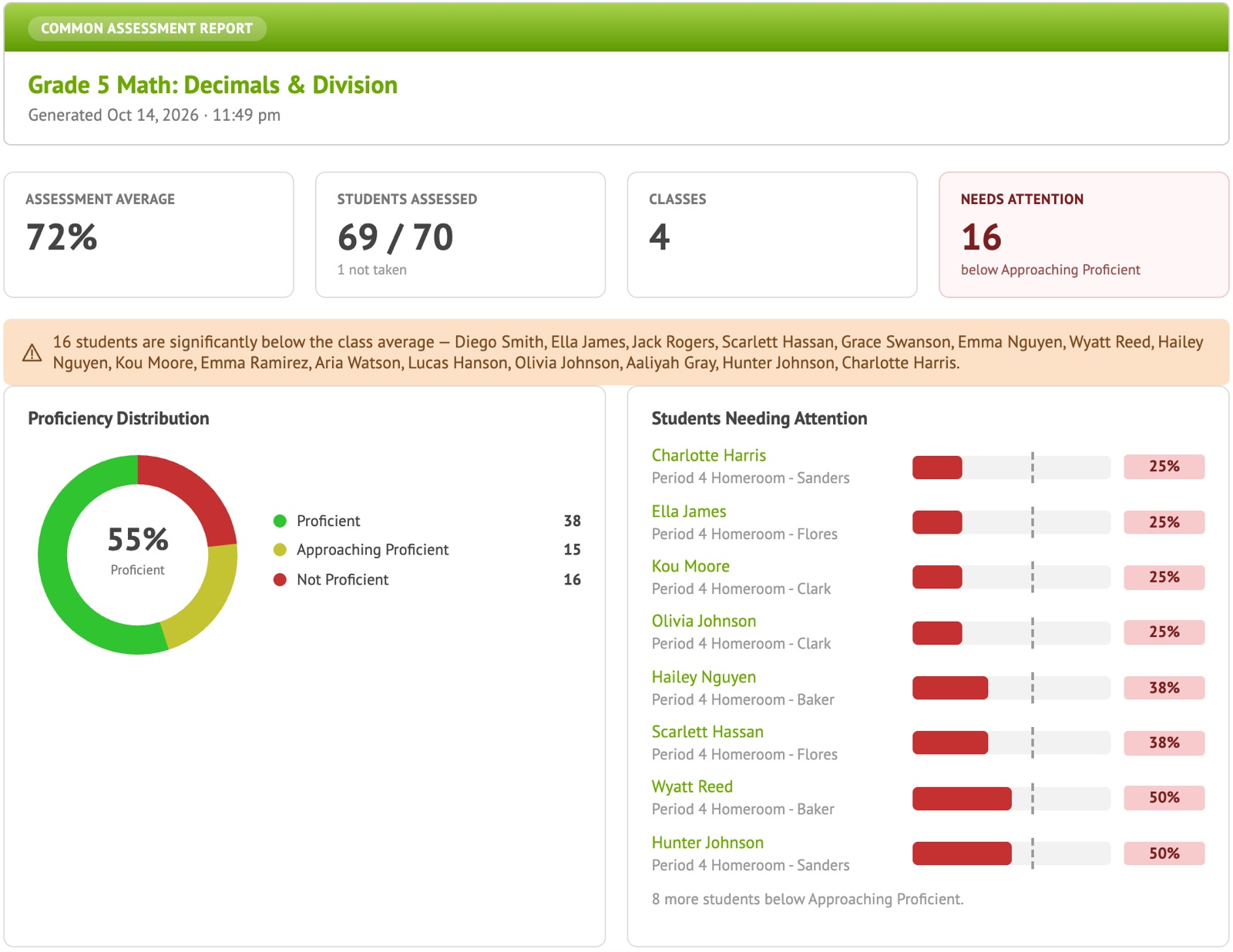
Common Assessment Report
-
Can we trust our assessments?
KR-20 reliability and standard error for every test, p-value and point-biserial for every question, and flags on questions that may be flawed.
Test and item statistics
-
Are we aligned to our state standards?
Questions are tagged to your state standards, and every report breaks results down by standard, from the district down to each student.
Standards-based reporting
-
Where are the gaps across our district?
Compare IEP, LEP, free/reduced lunch, gender and ethnicity groups on every standard, for any common assessment.
Results by student group
-
Do we have to write every assessment ourselves?
No. Start from ready-made interim and benchmark assessments and ACT/SAT practice benchmarks, import the tests you have, and share what your teachers build across the district.
Benchmarks and shared item banks
-
Will it work with our systems?
Rosters stay current through Clever or OneRoster. Launch from your LMS and send scores back with LTI 1.3. Export everything to CSV for your data warehouse.
Integrations
District reporting
From the district down to one student, by standard
Common assessments across schools
Every class that gave the benchmark, with status, participation and scores by standard. Results roll up from class to teacher to school to district, so everyone looks at the same numbers.
- Participation: who has taken it and who hasn’t
- Scores by standard at every level
- Export to CSV or PDF
Equity by standard
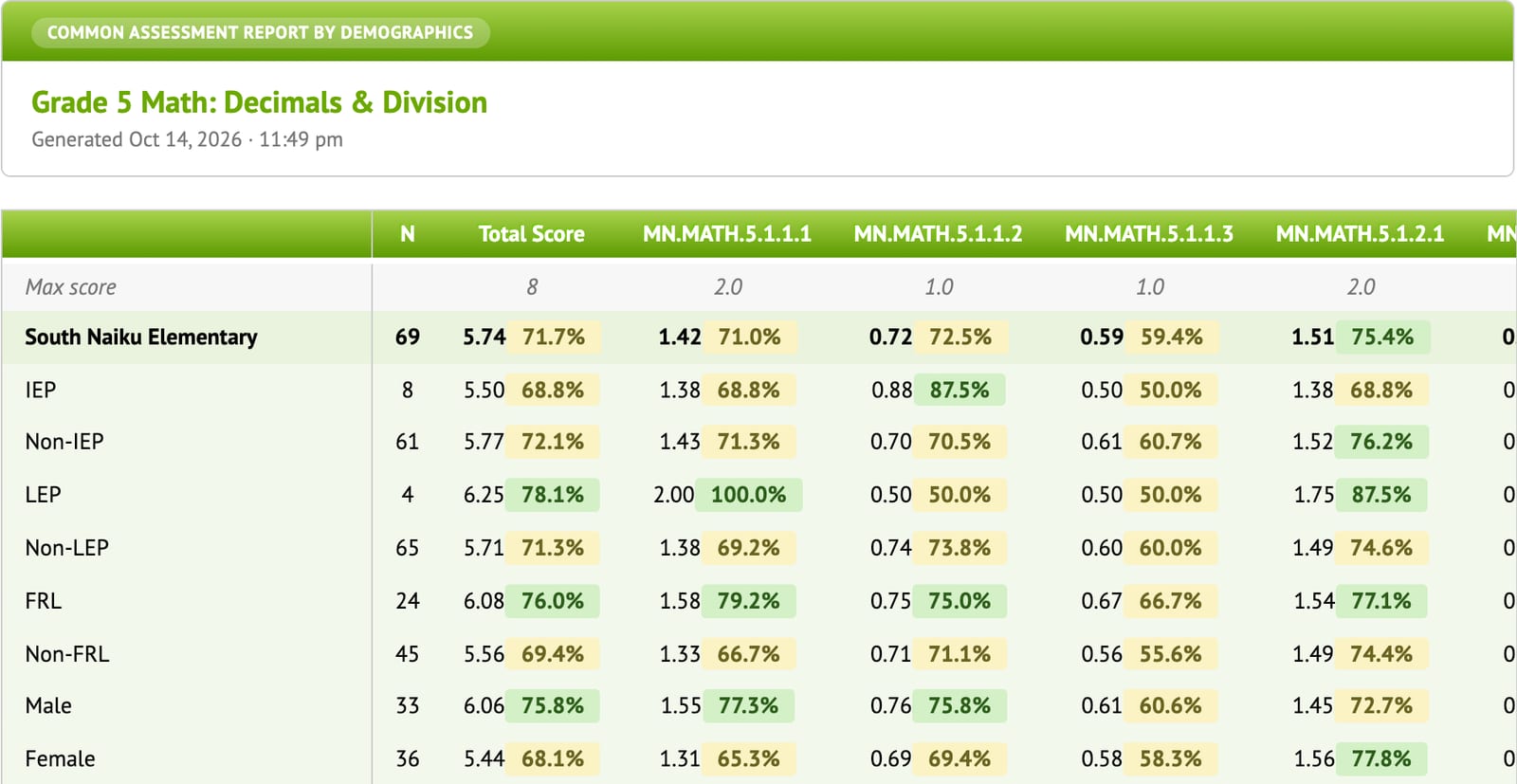
Break any common assessment down by IEP, LEP, free/reduced lunch, gender and ethnicity, on the total score and each standard, using the student information already in your rosters.
Assessment quality you can show
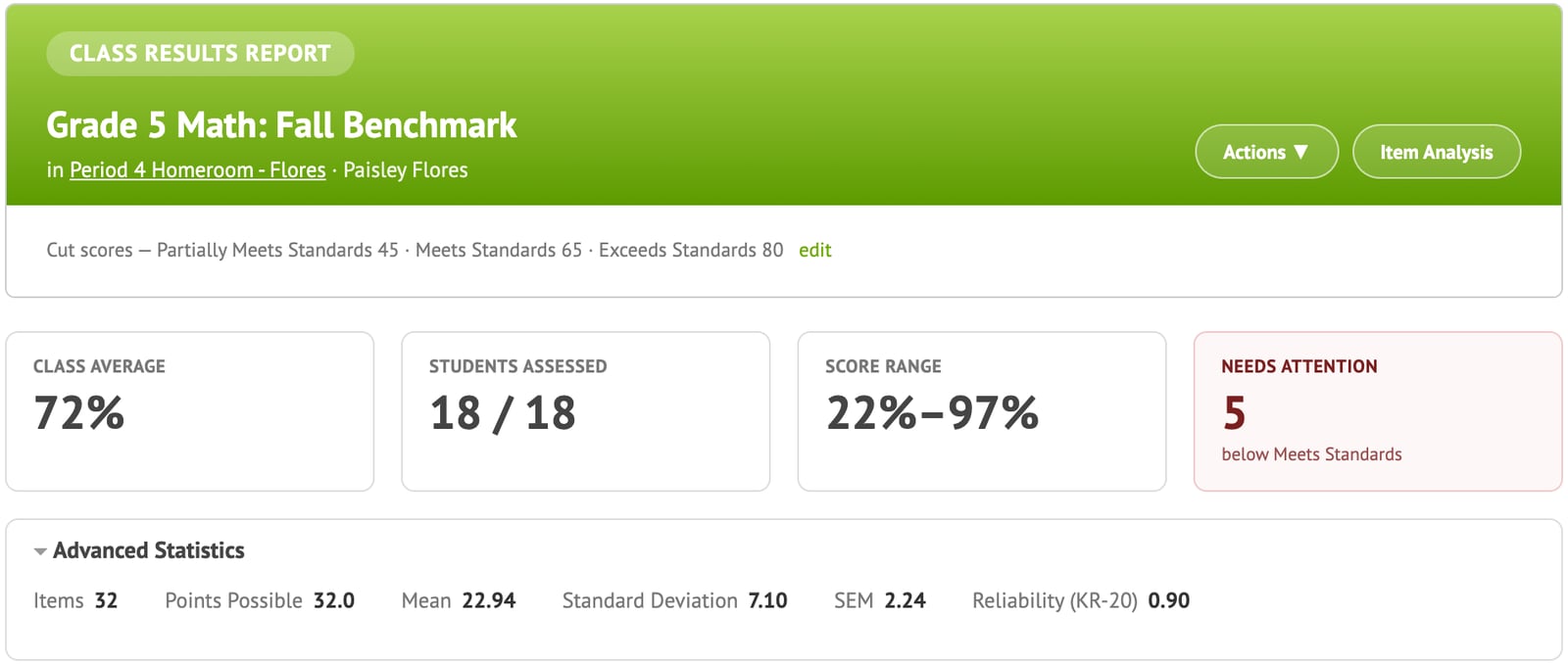
Know whether a benchmark is working before you make decisions from it. Naiku reports the statistics an assessment team expects, and flags questions to review.
- Mean, standard deviation, SEM and KR-20 reliability per test
- P-value and point-biserial for every question
- Answer-choice breakdown and flagged questions
- Fix a key once and every score updates
Results
Eagle Ridge Academy: data-driven instruction that shows up on the state test
Eagle Ridge built its Driven by Data routines on Naiku’s interim assessments and reports, including reports Naiku built at Eagle Ridge’s request. Its interim results also feed the Academy’s data warehouse.
Read the case study →+13 points in math proficiency for free/reduced lunch students since SY21-22 (38% → 51%), now above the state average for all students (45%)
14 → 4 points gap in reading between free/reduced lunch students and the state average, SY21-22 to SY24-25
Implementation
Fits the systems and the people you already have
Integrations
- Clever rostering and single sign-on
- OneRoster sync from your SIS
- LTI 1.3: launch from your LMS, scores sent back
- Infinite Campus Preferred Partner
- CSV exports for your data warehouse
Content
- Interim and benchmark assessments
- ACT and SAT practice benchmarks
- District and school item banks, shared through teacher teams
- Curriculum maps that tie standards to assessments
Support and privacy
- Onboarding and professional development included
- Paper option: scanned bubble sheets
- State or district benchmark results imported by our team
- Role-based access: teachers see their students, leaders see their schools
- COPPA compliant
FAQ
Questions district leaders ask
Can I see whether every class has given a common assessment?
Yes. The Common Assessment Report lists every class that has the test, how many students have taken it and who hasn’t yet, alongside the scores. Run it as soon as one class has results.
Can we compare student groups?
Yes. The Common Assessment Report by Demographics compares results for IEP, LEP and free/reduced lunch students, by gender and by ethnicity, on the total score and on each standard. It uses the student information from your rosters.
How much time will this take our teachers?
Less than they spend grading now. Teachers can start with tests they already have, and Naiku scores them automatically. Every school and district account includes onboarding and professional development, and in-app guided tours walk teachers through the main reports.
Can we give the same benchmark in every school?
Yes. Share one assessment with your teachers. Each teacher gives it to their own classes, and the Common Assessment Report rolls the results up from class to teacher to school to district, by standard.
Do you have ready-made benchmark assessments?
Yes. Naiku includes interim and benchmark assessments, and ACT and SAT practice benchmarks. You can also build your own district assessments, or import them.
How do we know our assessments are good quality?
Every test shows the mean, standard deviation, standard error of measurement and KR-20 reliability. Every question shows its p-value (difficulty) and point-biserial (discrimination), and Naiku flags questions that may be flawed. If a question’s key needs fixing, accept the right answer and every student’s score updates.
Are the questions aligned to our state standards?
Yes. Questions and assessments are tagged to your state’s standards, and every report breaks results down by standard. We update state standards from the official state documents.
Can we see state test results next to Naiku results?
Yes. Naiku support can import your state or district benchmark results so you can look at them alongside your Naiku assessments.
Can we get Naiku data into our data warehouse?
Yes. Every report exports to CSV and PDF. Eagle Ridge Academy feeds its Naiku interim results into the Academy’s data warehouse, so each student’s profile includes their assessment results.
Which systems does Naiku work with?
Clever for rostering and single sign-on, OneRoster for roster sync from your student information system, and LTI 1.3 to launch Naiku from your learning management system and send scores back. Naiku is an Infinite Campus Preferred Partner. Schoology districts connect through OneRoster.
How is Naiku priced?
Schools and districts license Naiku per student, with onboarding and professional development included. Request a quote and we’ll put together pricing for your school or district. Teachers can use Naiku free, or get Teacher Pro for $99 a year.
How do rosters get into Naiku?
Teachers can add classes and students themselves. School and district accounts keep classes and students up to date automatically through Clever or OneRoster, and Infinite Campus districts can also use LTI 1.3.
What about student data privacy?
Teachers see only their own students; principals and district leaders see their schools. Naiku complies with COPPA. Read our privacy policy for details.
Let’s look at your benchmark plan together.
A 30-minute walkthrough tailored to your district, with per-student pricing.