
For principals
Know where every classroom stands, without chasing spreadsheets.
Your teachers’ everyday assessments roll up into one school view. See which classrooms and students need support, whether every class gave the common assessment, and what to bring to your next PLC or data meeting.
What principals ask us
The questions you have, answered in one place
-
Which students and classrooms need help right now?
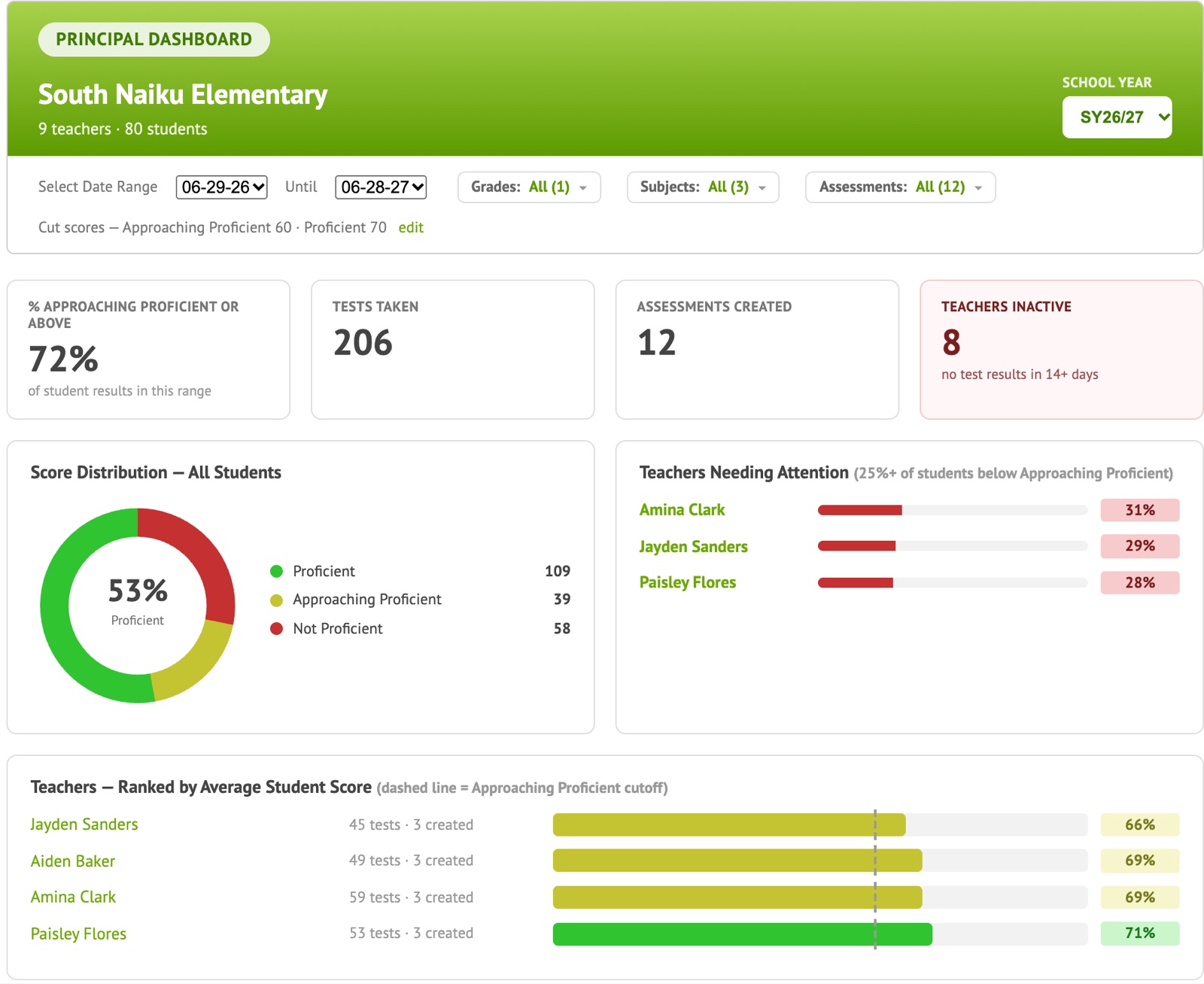
School-wide proficiency, the teachers whose classes need the most support, and a standards heatmap by teacher, on one screen. Filter by grade, subject and dates.
Principal Dashboard
-
Did every class give the common assessment?
See every class that has the test, how many students have taken it and who still needs to, next to the results.
Common Assessment Report
-
What do we bring to the PLC or data meeting?
Class-by-class results by standard, the questions most students missed and the wrong answer they chose, ready the day after the test.
Common Assessment Report by Item
-
Are we closing gaps between student groups?
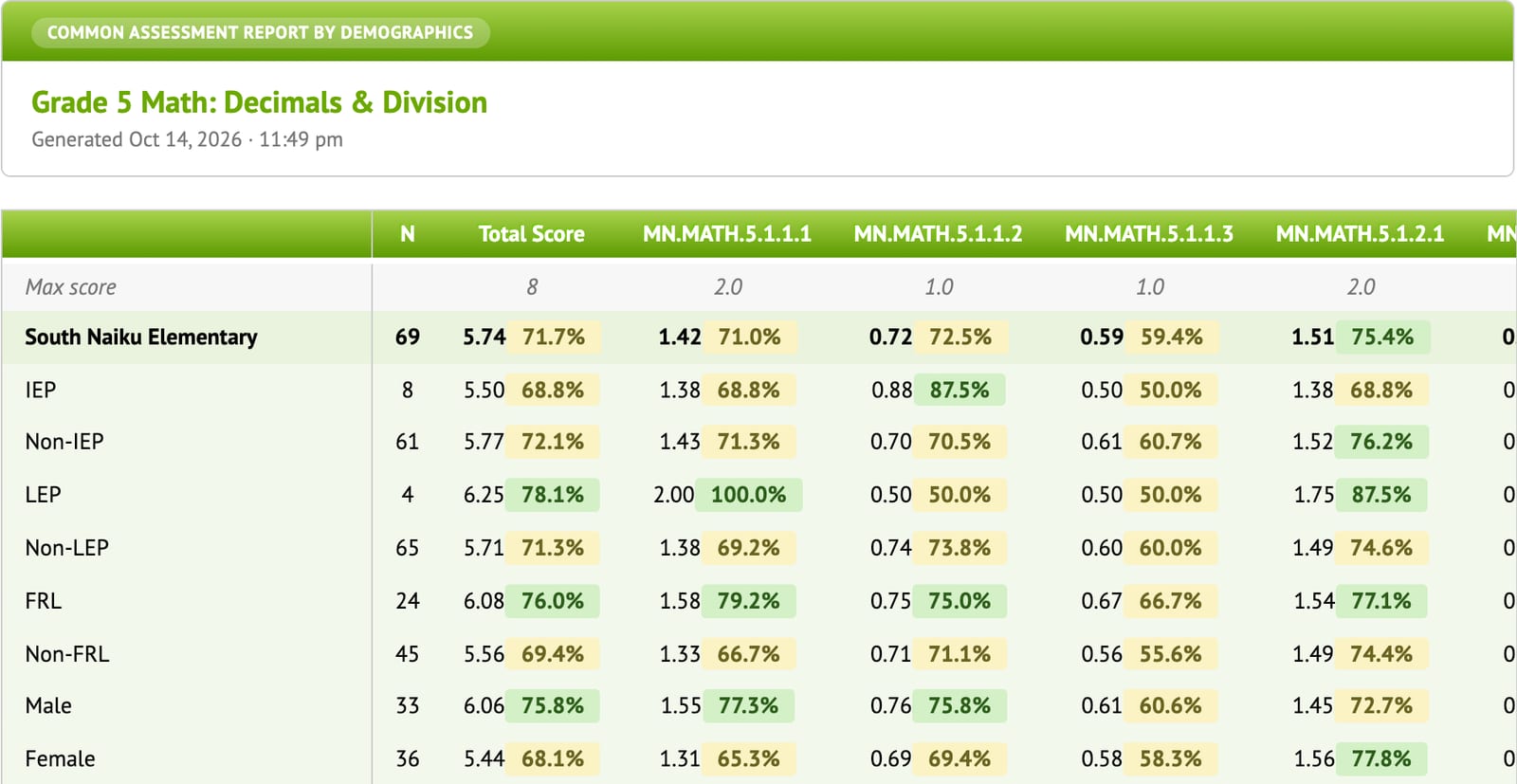
Compare IEP, LEP, free/reduced lunch, gender and ethnicity groups on the total score and on each standard.
Common Assessment Report by Demographics
-
How are my intervention students doing on their standards?
Pick any students and any standards and see how they’re doing on exactly those standards, across every test they’ve taken.
Standards Performance by Student
-
Will my teachers actually use it?
Teachers start with tests they already have and stop grading by hand. The Principal Dashboard also shows teachers who haven’t given an assessment lately, so you can follow up.
Built for teachers
Your reports
From the whole school down to one student
Principal Dashboard
The first thing you see when you sign in: school-wide proficiency, which teachers’ classes need support, teachers who haven’t assessed lately, and a standards heatmap by teacher.
- Filter by grade, subject and dates
- Spot a standard that’s weak across the whole grade
- Know which teachers to check in with this week
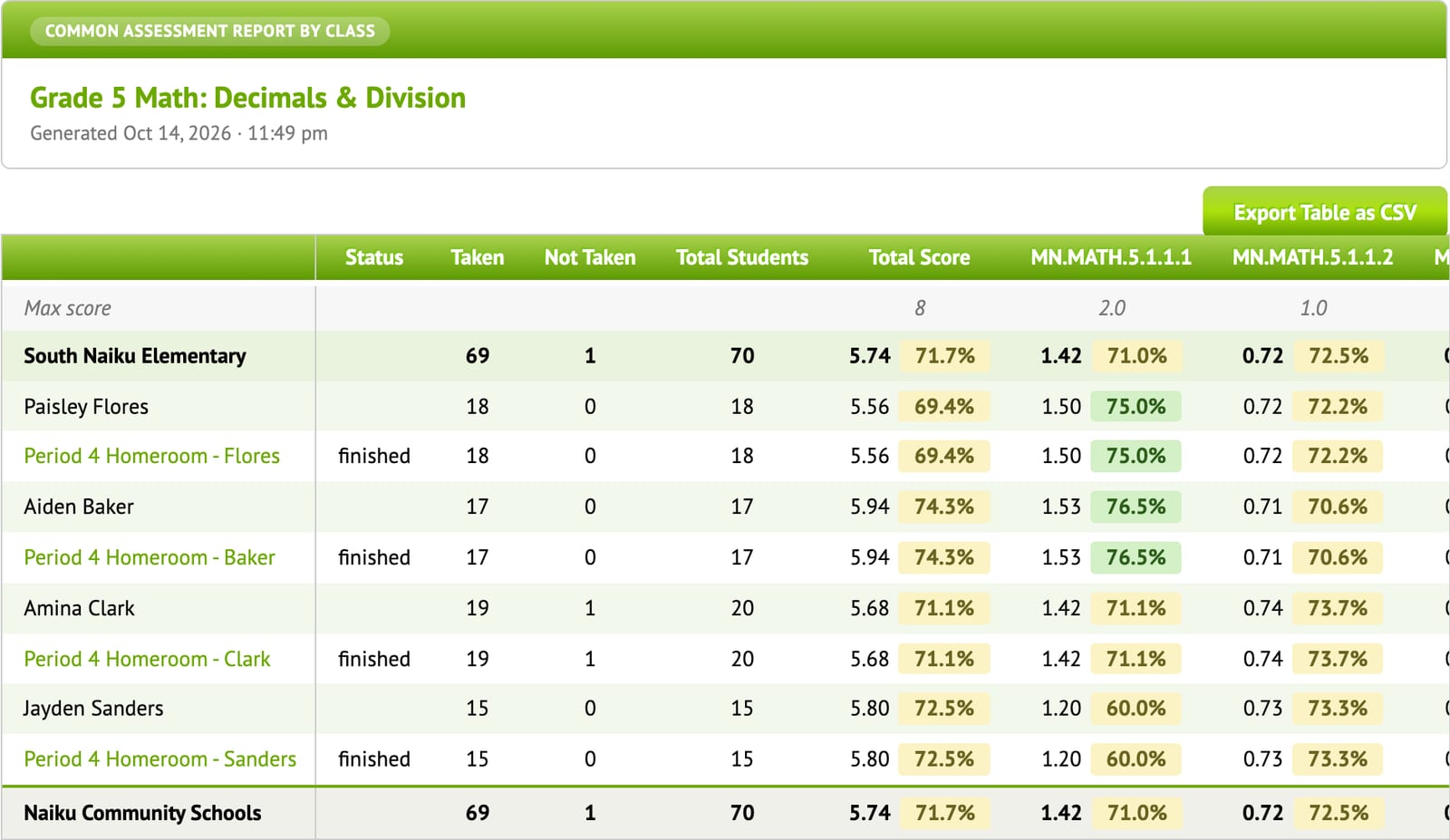
Common Assessment Report
For a test every grade-level teacher gave: each class’s status, how many students took it, and scores by standard. Results roll up from class to teacher to school.
- See which classes haven’t finished yet
- Compare teachers on the same standards
- Item-by-item breakdown for the PLC
Results by student group
The same common assessment, broken down by IEP, LEP, free/reduced lunch, gender and ethnicity, on the total score and every standard. See where gaps are opening or closing.
Data meetings that lead somewhere
A PLC cycle your teams can keep up with
- 1
Give one common assessment
Share the assessment with the grade-level team. Each teacher gives it to their own classes, online or on paper with scanned bubble sheets.
- 2
Look at the same data
The Common Assessment Report is ready as soon as classes finish: results by class, by standard, by question and by student group.
- 3
Plan the reteach
Teachers bring their Class Results insights: the small groups to pull and the misconceptions to address. Then check the next assessment to see if it worked.
Eagle Ridge Academy built its Driven by Data routines this way. Read their story →
Good for your teachers, too
Teachers get time back, so they actually use it.
Teachers use the tests they already have, Naiku grades them, and every report tells them what to do next. Onboarding and professional development come with every school account.
See what Naiku does for teachers →
FAQ
Questions principals ask
How do I see which classrooms need support?
The Principal Dashboard shows school-wide proficiency, which teachers’ classes need the most support, teachers who haven’t given an assessment lately, and a standards heatmap by teacher. Filter by grade, subject and dates.
Can I see whether every class has given a common assessment?
Yes. The Common Assessment Report lists every class that has the test, how many students have taken it and who hasn’t yet, alongside the scores. Run it as soon as one class has results.
Can we compare student groups?
Yes. The Common Assessment Report by Demographics compares results for IEP, LEP and free/reduced lunch students, by gender and by ethnicity, on the total score and on each standard. It uses the student information from your rosters.
Can I track specific students for intervention or special education?
Yes. Standards Performance by Student lets you pick any students and any standards and see how they’re doing on exactly those standards across every test they’ve taken. It’s useful for MTSS, intervention and special-education teams.
How much time will this take our teachers?
Less than they spend grading now. Teachers can start with tests they already have, and Naiku scores them automatically. Every school and district account includes onboarding and professional development, and in-app guided tours walk teachers through the main reports.
Are the questions aligned to our state standards?
Yes. Questions and assessments are tagged to your state’s standards, and every report breaks results down by standard. We update state standards from the official state documents.
Which systems does Naiku work with?
Clever for rostering and single sign-on, OneRoster for roster sync from your student information system, and LTI 1.3 to launch Naiku from your learning management system and send scores back. Naiku is an Infinite Campus Preferred Partner. Schoology districts connect through OneRoster.
How is Naiku priced?
Schools and districts license Naiku per student, with onboarding and professional development included. Request a quote and we’ll put together pricing for your school or district. Teachers can use Naiku free, or get Teacher Pro for $99 a year.
How do rosters get into Naiku?
Teachers can add classes and students themselves. School and district accounts keep classes and students up to date automatically through Clever or OneRoster, and Infinite Campus districts can also use LTI 1.3.
What about student data privacy?
Teachers see only their own students; principals and district leaders see their schools. Naiku complies with COPPA. Read our privacy policy for details.
See your school’s data the way you’d use it.
A 30-minute walkthrough of the Principal Dashboard and Common Assessment reports, with pricing for your school.