
For teachers
Less grading. Clearer next steps. An easier test day for your students.
Naiku is an online assessment platform built for the classroom. Give a quick check or a unit test, let Naiku score it, and get a short list of what to do tomorrow: who to pull into a small group, which standard to reteach, and who needs a quiet check-in.
Free for teachers, and it never expires. No credit card. Includes a sample class with results to explore.

Why teachers choose Naiku
Built for the way you actually assess
Whether it’s a 5-question exit ticket or a district benchmark, Naiku takes the grading off your plate and keeps test day simple.
-
Use the tests you already have
Upload a Word or PDF test, type the answer key, and students answer online. Or import from ExamView and TestGen.
-
Grading done for you
Instant scores, even for numbers and fractions written different ways. Score written answers with your rubric. Accept another answer later and every score updates.
-
See who's stuck while they test
Watch Progress shows how far each student is and flags anyone who seems stuck or is rushing, so you can step in while it still helps.
-
Easy for students
Students join with a simple access code (no passwords to remember), or sign in with Google, Clever, or their own username and password if you want it more secure. Works on Chromebooks, iPads and any web browser.
-
Fair and focused
Shuffle questions and answer choices, set a time limit, and give students built-in calculators, a highlighter and an equation editor.
-
Quick checks or unit tests
Exit tickets, bell ringers, quizzes and benchmarks. Multiple choice, matching, ordering, multi-part, reading passages and essays.
A test day with Naiku
Before, during and after
- Before
Set it up in minutes
Upload your test and type the key, or build your own. Shuffle questions, set a time limit, and turn on calculators or the highlighter. Assign it to your class.
- During
Students test, you watch
While students test, the Watch Progress report shows how far each student is and flags anyone who seems stuck or is rushing. Students rate how sure they are as they go.
- Right after
Scores are already done
Multiple choice, numbers, matching, and more items are scored the moment students submit. Score written answers with your rubric, one question at a time across the class.
- Tomorrow
Teach what they need
The Class Results report lists who needs attention, the standard to reteach, the wrong answer many students chose, and students who were sure of a wrong answer. Export scores, or send them straight to your gradebook when your school connects Naiku.
Your reports
Answers, not spreadsheets
Every report starts with what matters most, in plain language.
Class Results with Insights
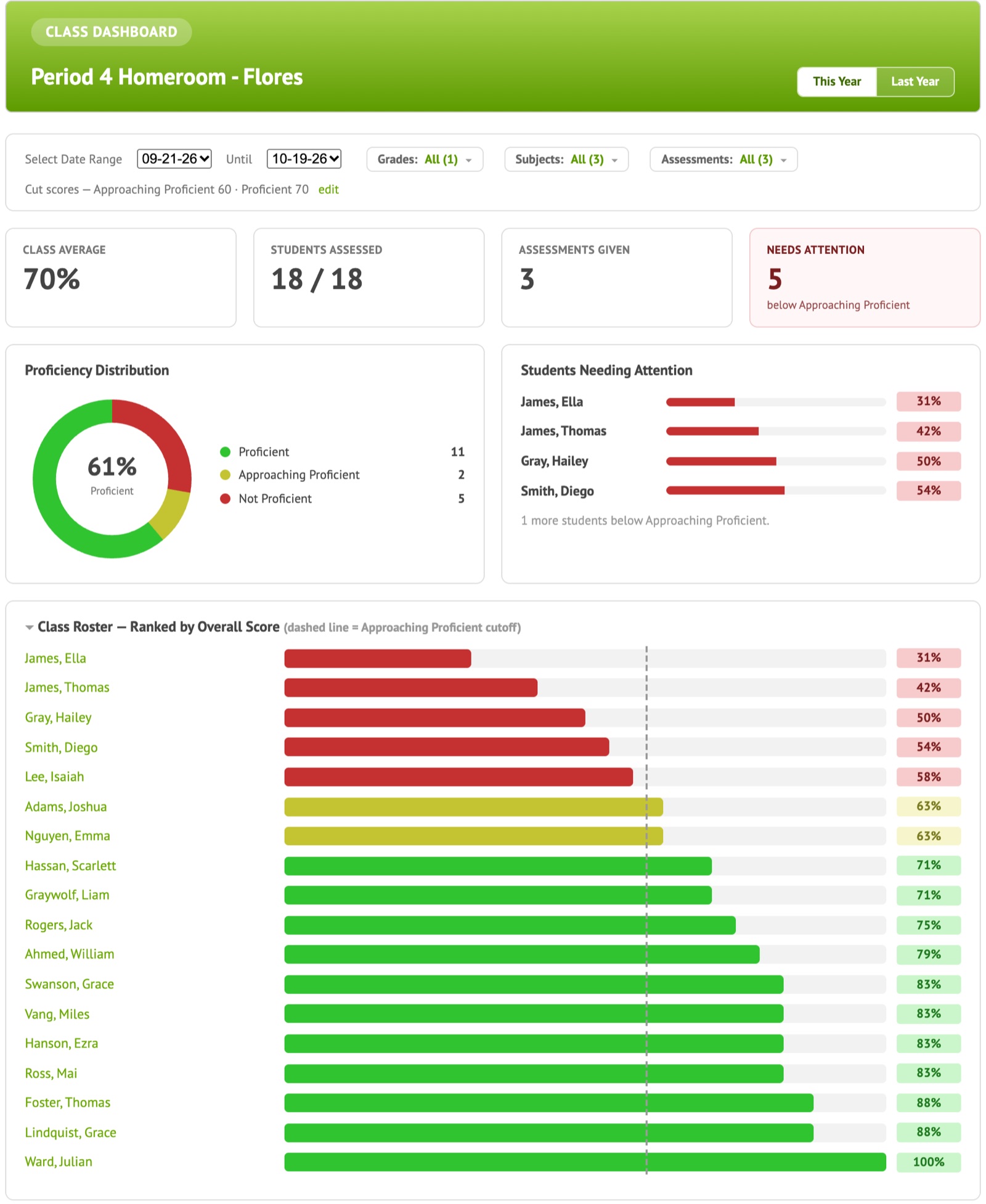
Right after a test, see your class average, who needs attention and a short list of insights: a small group to pull, a standard to reteach, students who were sure of a wrong answer, and students who may have rushed.
- Proficiency bands set by your own cut scores
- Every student’s score on every standard, color-coded
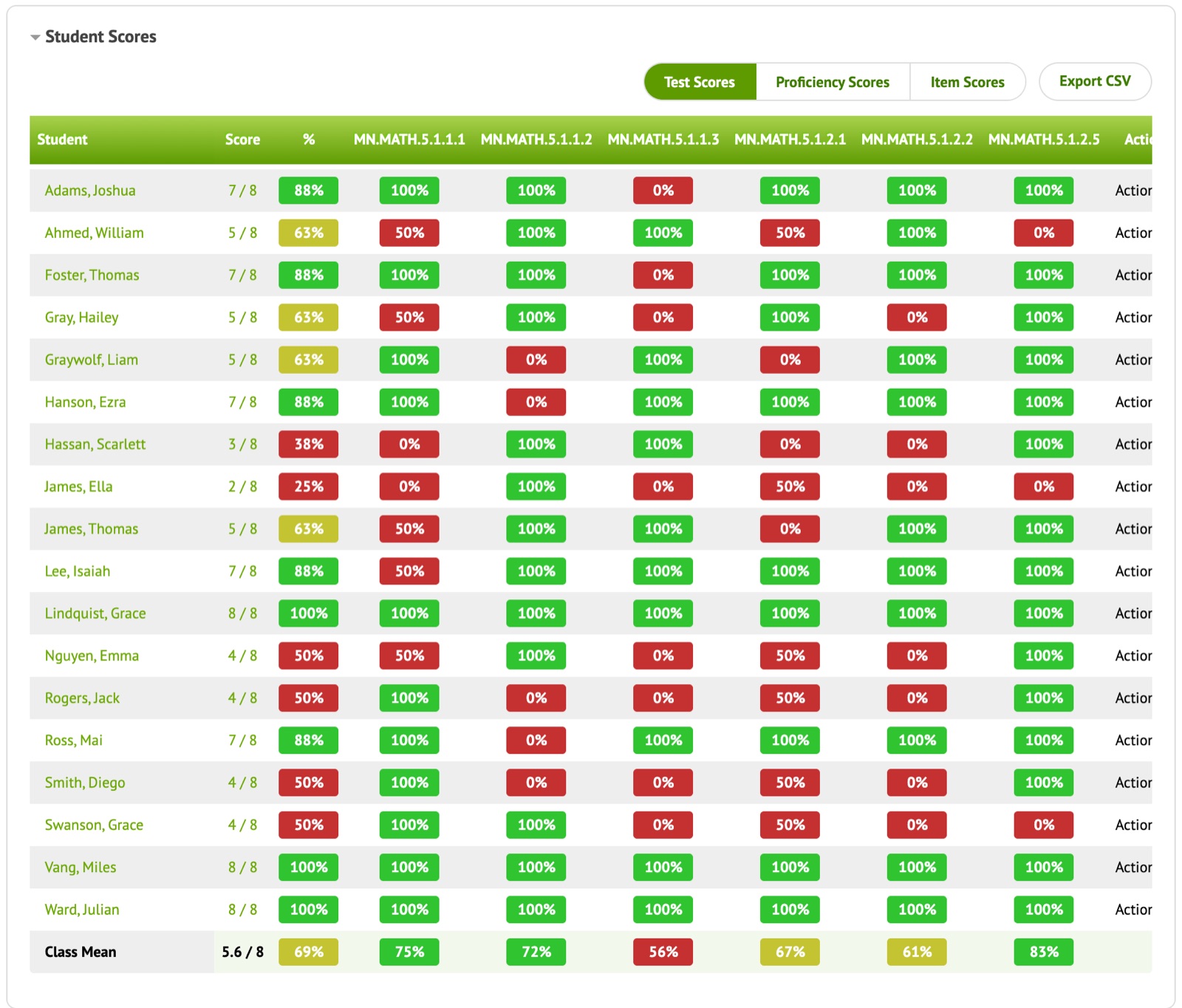
Item Scores: every wrong answer at a glance
One grid shows the wrong answer each student chose on every question, and marks students who were very sure of a wrong answer. Spot the misconception behind a missed question, and which students share it.
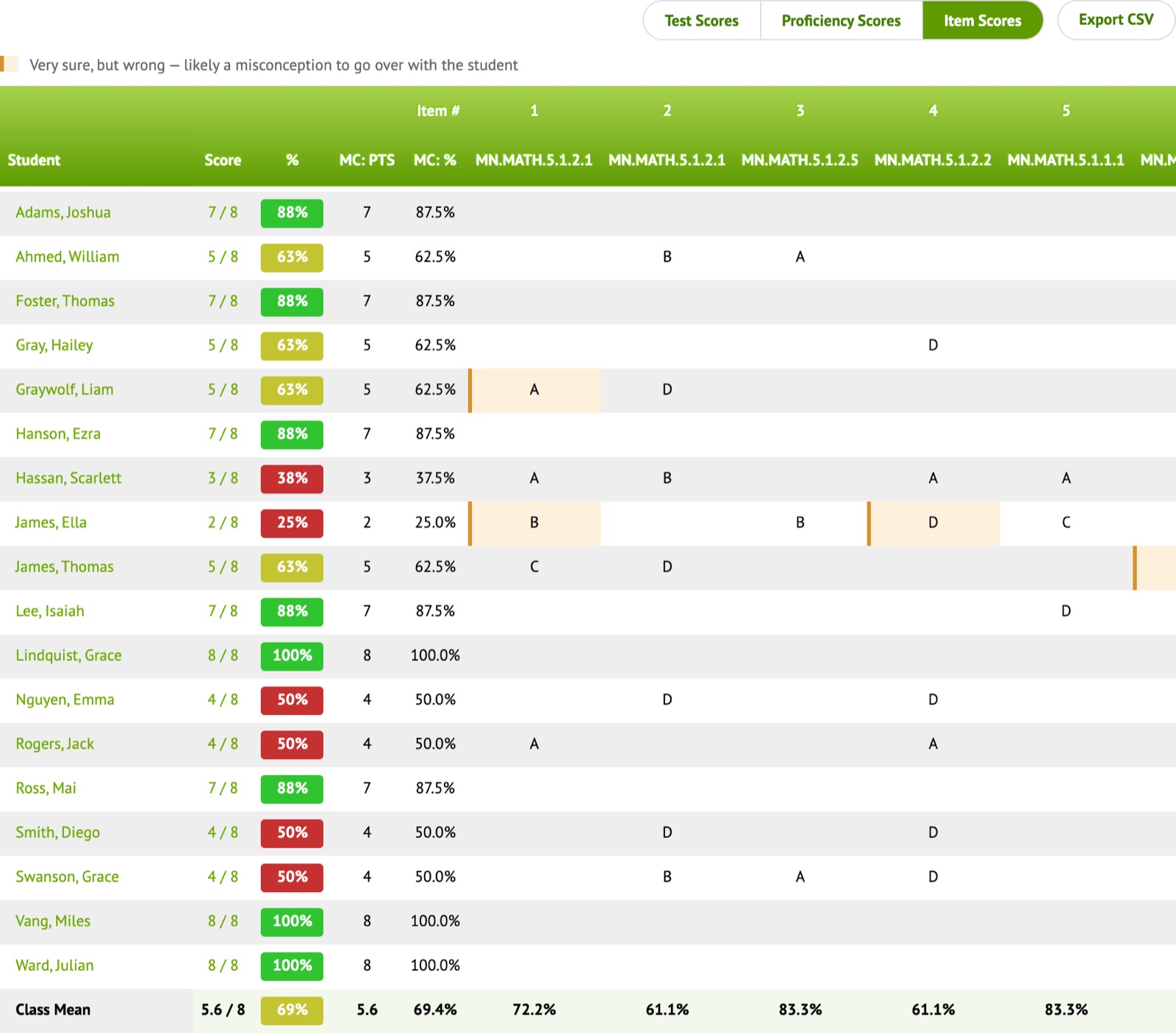
Item Analysis that finds misconceptions
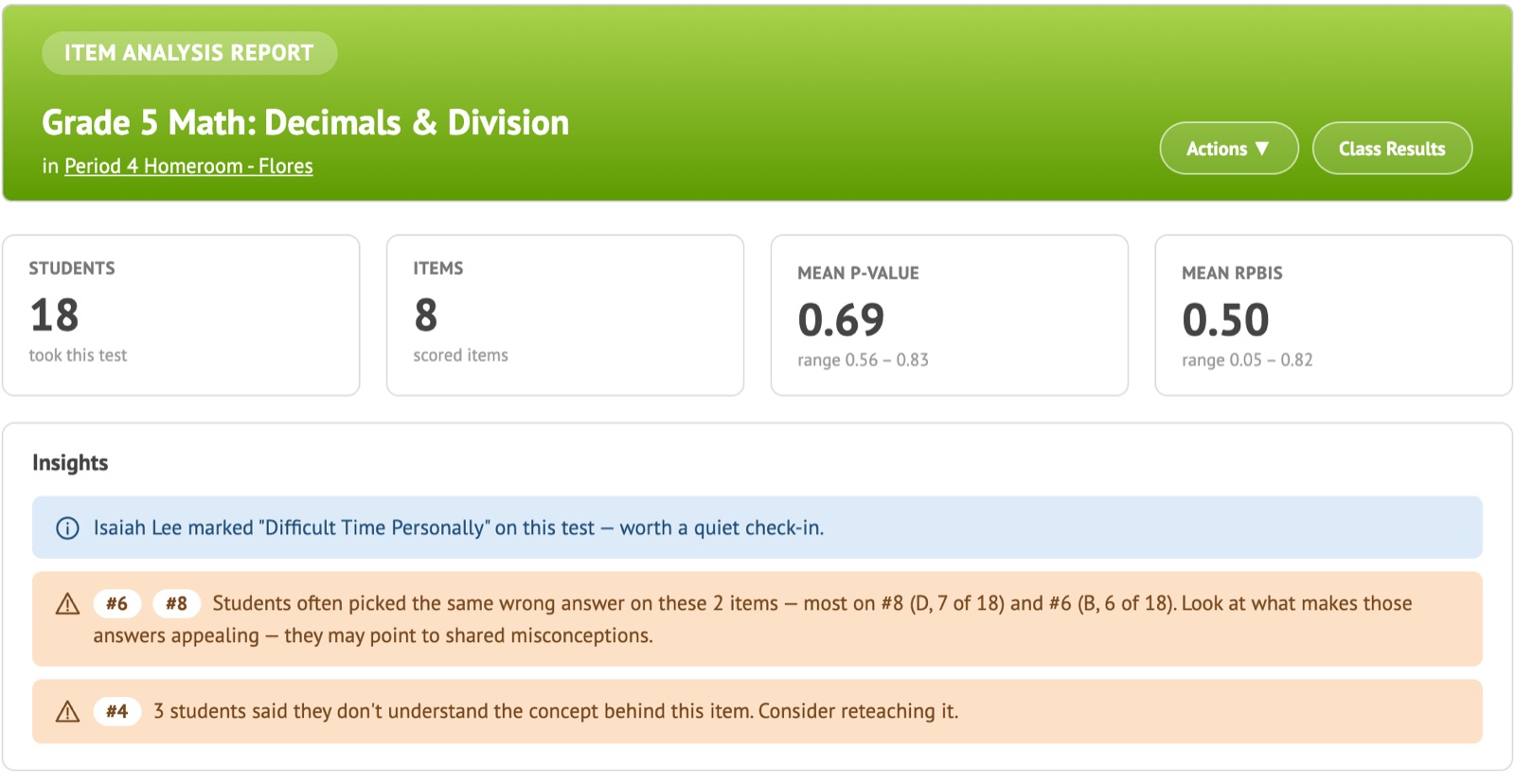
See which questions worked and which didn’t. Naiku flags answers many students chose, questions students say they didn’t understand, and questions that may be flawed.
- Answer choice breakdown for every question
- Student reflections and confidence, item by item
Class Dashboard across the year
Follow every student across all your assessments. Trend lines and a standards heatmap show who is growing and which standards still need work. The Last Year view shows how this year’s students did last year, for a fast start in the fall.
Built for students, too
Students predict their score, rate how sure they are on each question, and reflect on what they missed. They see their own results and learn to judge their own understanding. You see it all, question by question.
More than a quiz tool
A quiz tool gives you a score. Naiku tells you what to do next.
| Feature | Naiku | Typical quiz tool |
|---|---|---|
| Scores multiple choice automatically | ✓ | ✓ |
| Use your own Word or PDF test as is | ✓ | — |
| Every question tied to a standard | ✓ | — |
| Score written answers with a rubric, question by question | ✓ | — |
| See who is stuck or rushing during the test | ✓ | — |
| Common wrong answers and flawed questions flagged | ✓ | — |
| Plain-language next steps: small groups, standards to reteach | ✓ | — |
| Student confidence, predictions and reflections | ✓ | — |
| Each student followed across the year, by standard | ✓ | — |
FAQ
Questions teachers ask
Can I use the tests I already have?
Yes. With Quick Key, upload your test as a Word or PDF file and type in the answer key. Students see your test and answer online, and Naiku scores it for you. You can also import tests from ExamView, TestGen or XML, or build your own.
Does Naiku grade written answers?
Short answers are scored automatically, including numbers and fractions written in different ways (2/4 for 1/2, or .50 for 0.5). For essays and other written responses, you score them with your rubric: Naiku shows you one question at a time for the whole class, so grading goes quickly and stays consistent. If you decide later that another answer should count, accept it and every student’s score updates.
How is Naiku different from Google Forms or a quiz app?
Quiz tools are great for collecting answers and giving a score. Naiku is built for assessment: every question can be tied to a standard, and the reports tell you why students missed a question and what to do next. Which students to pull into a small group, which standard to reteach, which wrong answer many students chose, and who rushed. Naiku also follows each student across the year by standard, and lets your team compare classes on the same common assessment.
Does it work on Chromebooks and iPads?
Yes. Naiku runs in any modern web browser on Chromebooks, iPads, Windows and Mac computers. There is nothing to install.
How do students log in?
Students can join an assessment with a simple access code and pick their name, so there are no passwords to remember. You can also have students type their name and a password instead, so they don’t see a list of classmates. Students can also sign in with Google or with their own username and password. Schools can use Clever single sign-on, or launch Naiku from their learning management system with LTI 1.3.
Can I see students’ progress while they’re testing?
Yes. Watch Progress shows how far each student has gotten and flags students who seem stuck on a question or are rushing, so you can step in during the test instead of finding out afterward.
Can I give a paper test?
Yes. Print the test and bubble answer sheets, then scan the sheets with a webcam (included with Teacher Pro and with school and district accounts). Scores land in the same reports as online tests.
Do scores go into my gradebook?
Yes. Export scores to your gradebook, or, if your school launches Naiku through LTI 1.3 (for example from Infinite Campus), scores are sent back automatically.
Can I share tests with my grade-level team or PLC?
Yes. With Teacher Pro or a school or district account, Teams lets teachers share assessments with each other. With a school or district account, teams also share results, and common assessment reports compare every class on the same test.
Is it really free?
Yes. The Teacher plan is free and never expires, with no credit card, and includes a sample class with results to explore. Teacher Pro adds scanning, benchmark and ACT/SAT practice tests, Teams and priority support for $99 a year. For every teacher in your building, talk to us about a school or district account.
What about student data privacy?
Teachers see only their own students; principals and district leaders see their schools. Naiku complies with COPPA. Read our privacy policy for details.
Try Naiku with your next quiz.
Free for teachers, no credit card, and it never expires. Want scanning and benchmark tests? Teacher Pro is $99 a year. When you’re ready, we’ll help you bring Naiku to your whole school.