
Let Students Retake a Test
Naiku has three ways to give students another try.
| I want to… | Use | Which score counts |
|---|---|---|
| Let one student start over | Let student retake | The new attempt |
| Let students retake on their own | Allow Retakes | You choose |
| Require a retake for low scores | Auto Retake | The attempt above your cut score |
One student starts over
- Open the test’s Watch Progress.
- Next to the student, choose Actions → Re-take, and confirm.
You can also open the student’s result and choose Actions ▼ → Let student retake.
This removes the student’s current result so they can start again. It then appears under Previous Results on Class Results.
Students retake on their own
- Open the test and choose Actions ▼ → Edit.
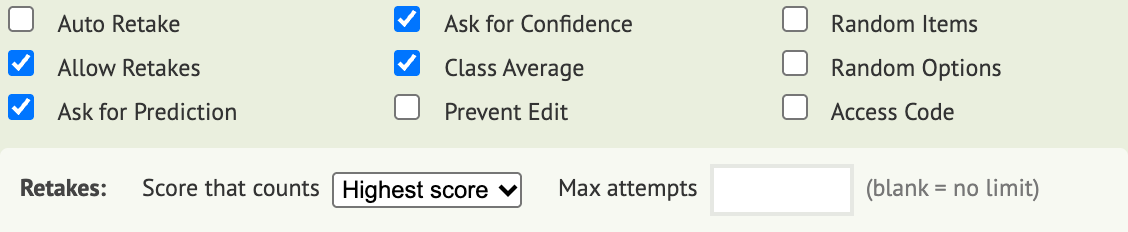
- In the test’s options, turn on Allow Retakes.
- Choose the Score that counts: Highest score (the default), Latest attempt or First attempt.
- Set Max attempts, or leave it blank for no limit.
- Save the test.
Students see their results, reflect, and click Retake test when they’re ready. The score that counts is the one in your reports and the one sent to your gradebook.
Allow Retakes is for tests students take online. It doesn’t apply to scanned bubble sheets or Quick Key tests.
Require a retake for low scores
Turn on Auto Retake in the test’s options. Students who score at or below your cut score must take the test again. Auto Retake and Allow Retakes can’t be on together.
Using Infinite Campus? See Re-Do an Assignment in Infinite Campus.