
Giving the Test to Students in Campus
Students take a linked Naiku test from Infinite Campus. They don’t need a separate Naiku sign-in.
What to tell students
- Sign in to Infinite Campus (Campus Student).
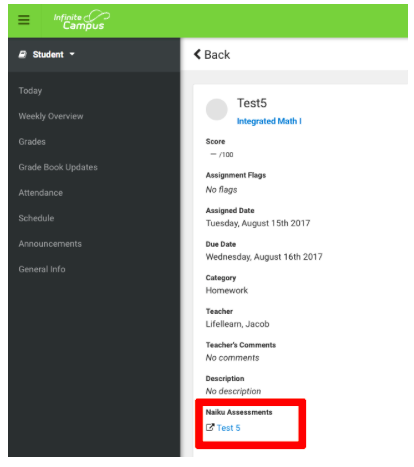
- Go to Today, or open your class, and click the assignment.
- At the bottom, under the Naiku assessment, click the test’s name.
- Naiku opens in a new tab. Take the test and click End exam when you’re done.
If the assignment accepts scores, the student’s score goes to the Campus gradebook.
If a student has trouble
- Nothing opens: allow pop-ups for Campus. Naiku opens in a new tab.
- The assignment isn’t there: check that it’s published to the student’s section and that its dates have started.
- New to the class today: Naiku gets roster changes overnight, so they may be able to start tomorrow.
- Needs to take it again: see Re-Do an Assignment in Infinite Campus.
More help: Signing In from Infinite Campus