Item Level Scoring
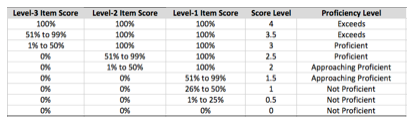
Item Level Scoring gives each student a 0 to 4 score, including half points, based on which levels of questions they got right. It follows the standards-based approach described by Marzano (2006).
Item levels
- Level 1: basic details and processes.
- Level 2: more complex ideas and processes.
- Level 3: goes beyond what was taught in class.
The score scale
| Score | Meaning |
|---|---|
| 4.0 | Everything in 3.0, plus in-depth inferences and applications beyond what was taught |
| 3.0 | No major errors on the simple or complex content taught |
| 2.0 | No major errors on the simpler content, but major errors on the complex content |
| 1.0 | With help, partial understanding of some simple and complex content |
| 0.0 | Even with help, no understanding shown |
Set it up
- Create or edit your test.
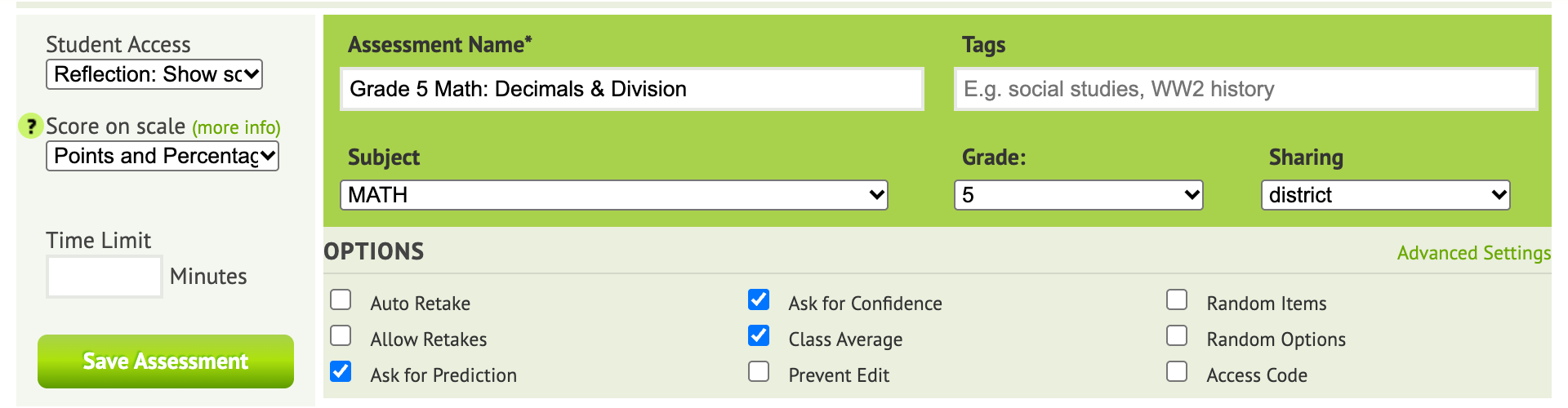
- Under Score on scale, choose Item Level Scoring: 0-4.
- For each item, click Edit next to Settings and set the Level. Every item needs one, or the test won’t save with this scoring.
- Save the test and assign it.
How scores are calculated
Naiku assigns each student’s score from the pattern of levels they answered correctly: