
Updating the Naiku Powerschool Plugin
If you’re using the new Power Teacher Pro (PTP) gradebook from PS, please make sure you have updated the Naiku plugin on your PowerSchool server. This will allow Naiku to transfer scores into PTP.
Follow these steps to update the plugin on PS.
1. Log into your Admin account on Naiku. Click on your name in top right to get to your user profile. Click on the name of your district in the green bar at the top. Click on the Powerschool tab. You should now be on this page.
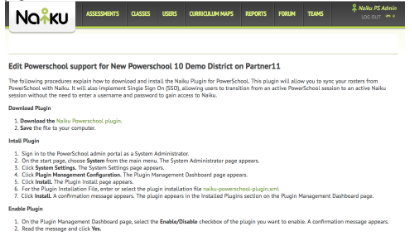 Click on Naiku Powerschool plugin to download the latest plugin to your computer.
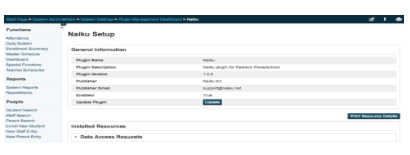
2. Log in as an Admin into your PS and select System (under Setup) on the left side navigation bar. Select System Settings under Server. Select Plugin Management Configuration. Select the Naiku plugin. This will take you to the Naiku Setup page. Select Update. Browse to find the Naiku Powerschool plugin on your computer and then click on Submit. Make sure the plugin is enabled. You’re done.
Now your teachers can successfully transfer scores from Naiku to PTP. See Transferring Scores in PowerSchool for how teachers send scores.